Lodging Calendar
Overview
The lodging calendar displays all overnight or daycare guests' location for a given week.
If you checked out a pet and forgot what room the pet is in,
- Navigate to the Lodging Calendar and do a 'CTRL + F' search for the pet's name. Be sure to keep in mind last name as well! (We have lots of Bellas!)
The lodging calendar is an easy way to change a pet's room number.
- Navigate to the pet (make sure last name is correct!), and simply drag and drop the pet's name into the new desired room.
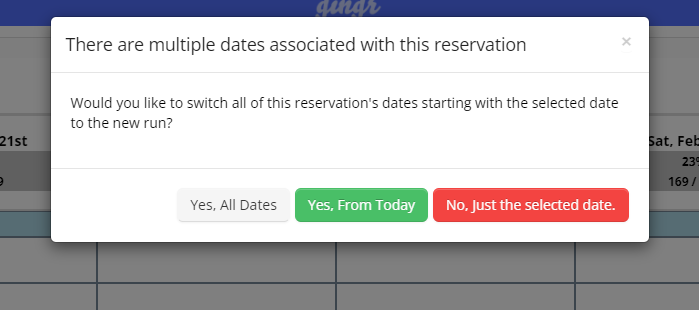
- This will come up with a notice that looks like this:
- 'Yes, All Dates' should never be selected, as if a pet is currently checked in, it will remove the pet's prior room history.
- Select 'Yes, From Today' - this is the only option that should ever be selected.
- 'No, Just the selected date.' should never be selected.