Daycare Punchcards
Overview
Daycare punchcards are packages clients can buy in advance to save on the daily daycare rate. This is a quick overview on everything punchcards!
How to check how many punches are left and the expiration date on a current punchcard:
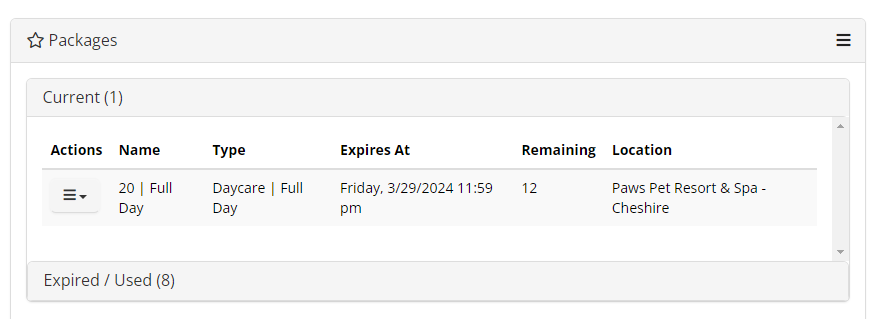
- Navigate to the correct owner's account, find the 'Packages' section:
- This will list the name of the package, what the package is for, the expiration date, and remaining punches.
How to purchase a new punchcard:
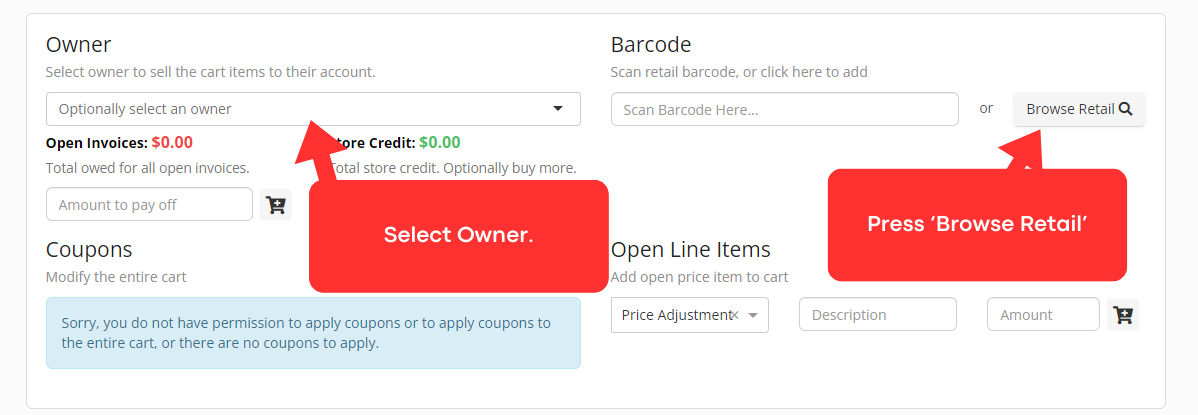
- Navigate directly to the cart (press the cart button on the top right of the screen).
- Select the owner.
- Press 'Browse Retail'
- Select the desired punchcard option.
- Please look at client's reservation history and ask them what package they want to ensure the correct punchcard option is selected.
- Take payment and check out the customer.
Assigning 'Gets Punchcard' icon
- If a customer typically gets a punchcard, please add the 'Gets Punchcard' icon to their animal profile for future reference, making checkouts easier.
- Assign the 'Auto-renew Punchcard' icon if the client is a very regular customer and they want to get their punchcard auto-renewed without us asking them.