Day Care Arrivals (Check-In) at Front Desk
Policy & Operating Procedure
The goal of this procedure is to provide our Clients with exceptional customer service and ensure that all the important details/information about their pet(s) is captured/verified.
To prepare for the Clients and Guests that are scheduled to arrive today, review the following in Gingr:
Dashboard -> Expected Today
- Search the word "Daycare" to filter only by daycare to see all the daycare guests scheduled to arrive today. It will also display the total amount on the right-hand side of the search bar.
- Search the phrase 'First Day' to identify any first time daycares. Please use extra care with first time clients and pets.
When the Client and Pet(s) Arrive:
- GREET THE CLIENT STANDING UP
- Greet clients in a friendly manner: “Hello, how can I assist? Who do we have checking in today?”
- On the 'Expected Today' section, search by the dog's first or last name (you cannot search by both at the same time!). Ensure you confident about the pet's first AND last name (we have lots of Bellas!)
- Verify the pet's vaccines and paperwork is up to date (a red shield icon will appear if records are needed, an orange shield will appear if a pet's records will expire soon, and no shield icon will appear if the pet is all up-to-date). Keep in mind we have a 10-day grace period for records that have expired. Ask the client for any missing paperwork. If a client does not have a requirement or is past the 10-day grace period, DO NOT PROCEED and get a supervisor or manager for assistance.
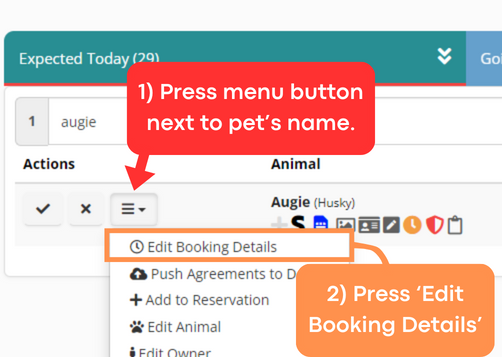
- Press the menu button next to the pet's name (three lines, looks like a hamburger), and then press 'Edit Booking Details'
- Then,
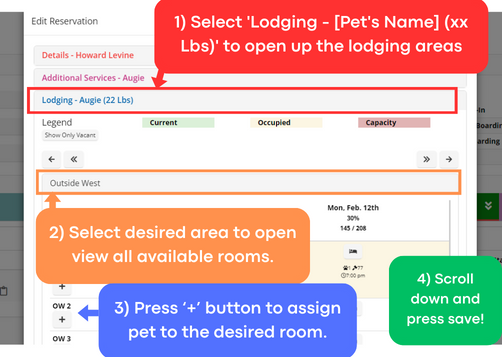
- Select 'Lodging - [Pet's Name] (xx Lbs)' to open up the lodging areas - we want to assign a room for the dog.
- Select the desired lodging area to open view all available rooms.
- Press ‘+’ button to assign the pet to the desired room.
- Note: If you are unsure of where to book a dog, please see the information at the bottom of this document.
- Scroll down and press save!
- Obtain pet and pet's room card, and with the pet, proceed to the chosen room.
- If you see the room is unexpectedly currently being occupied or being cleaned, proceed to the closest computer to change the pet's room number and proceed to the new room.
- Place room card outside of room and put dog in room.
- Ensure everything is removed from the dog (harnesses, leashes, collars).
- Place any food, treats, or toys the pet may have brought in the basket outside their room.
- Note: If dog is in Mini Mansions or Double Deckers, leave the leash, harness, and/or collar in the basket outside of their room as well.
- Proceed to hallway with pet's leash, harness and/or collar.
- Note: if pet also brings a bag that is too big to put in the basket, take the important belongings out of the bag and put them in the basket and proceed to the next step with the pet's bag.
- Place their leash, harness, and/or collar (and bag, if applicable) on the appropriate, labeled hook in the hallway. PLEASE MAKE SURE IT IS ON THE RIGHT HOOK!
- Ensure Gingr reflects the pet's accurate room.
Note: If a pet changes anything with their reservation (daycare type, different service, etc), you must tell the back staff as soon as possible. If a pet adds on a grooming service for today's date, let the specific groomer know.
WHERE TO ASSIGN DAYCARE DOGS:
- Save "Jumbo" rooms for very large dogs or families with multiple pets.
Room assignment order:
| Small Dogs: | Start with Mini Mansions, unless otherwise desired. | ||||||
| Medium/Large Dogs: | West -> | East -> | In-Between -> | Outside West -> | Luxuries -> | North. | |